Amazon — Livestream & Real-Time Engagement Platform
User problem
Amazon relied on a livestream platform for ~10,000 internal events per year, including high-visibility company communications.
The system had grown across multiple tools. This led to inconsistent behavior, heavy manual coordination, and high failure risk during live events.
Constraints
- No tolerance for failure during live events
- Multiple roles (organizers, operators, presenters, viewers) with different needs
- Inconsistent workflows across event types
- High concurrency (~160K viewers)
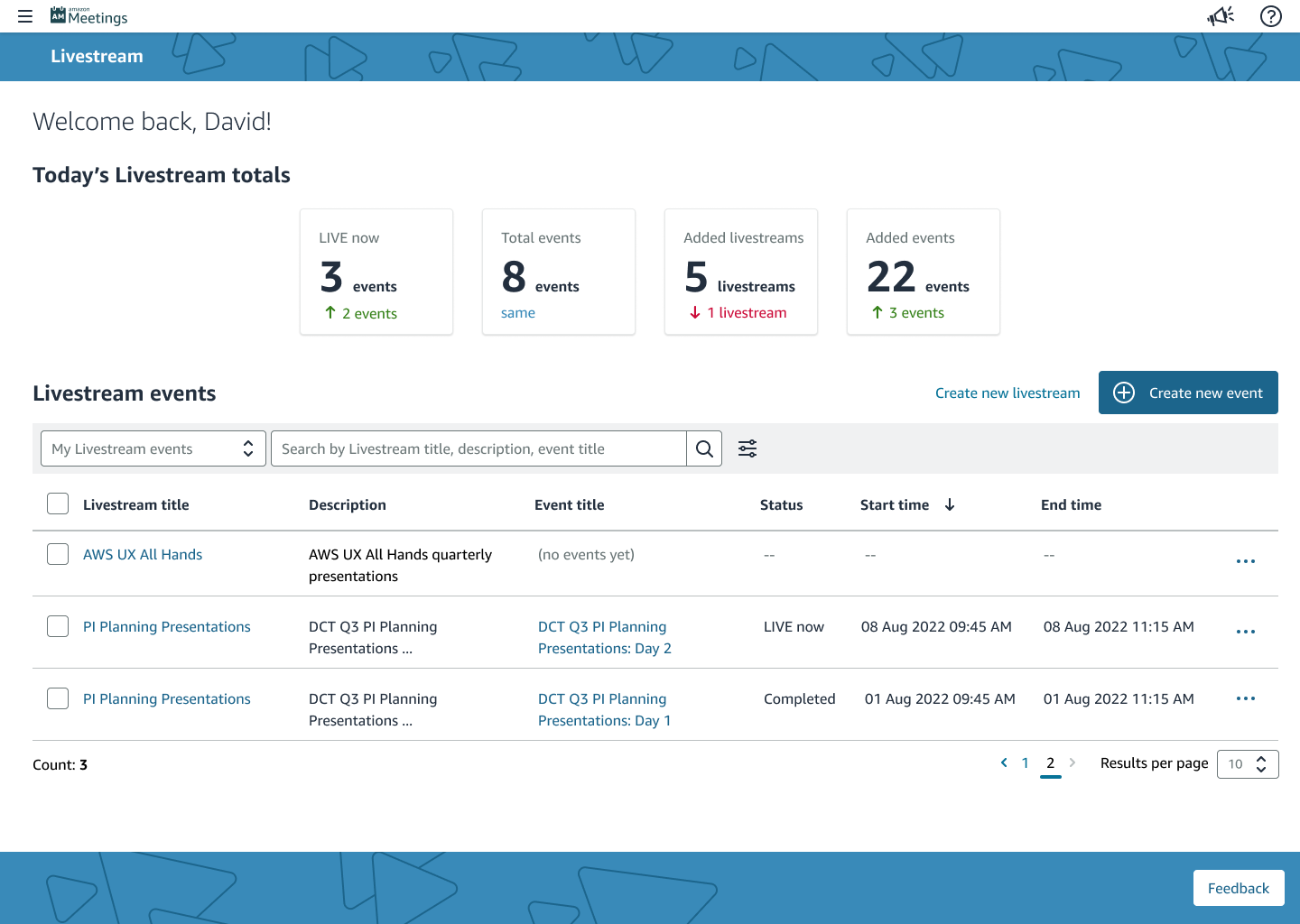
Reducing Setup Errors Before Events Go Live
I consolidated event setup, configuration, and execution into a single guided workflow.
Operators can now see dependencies earlier instead of discovering issues during the event. I used an internal LLM tool to analyze support tickets and identify recurring failure points, then fixed them at the workflow level.
This shifted error detection from live events to setup.
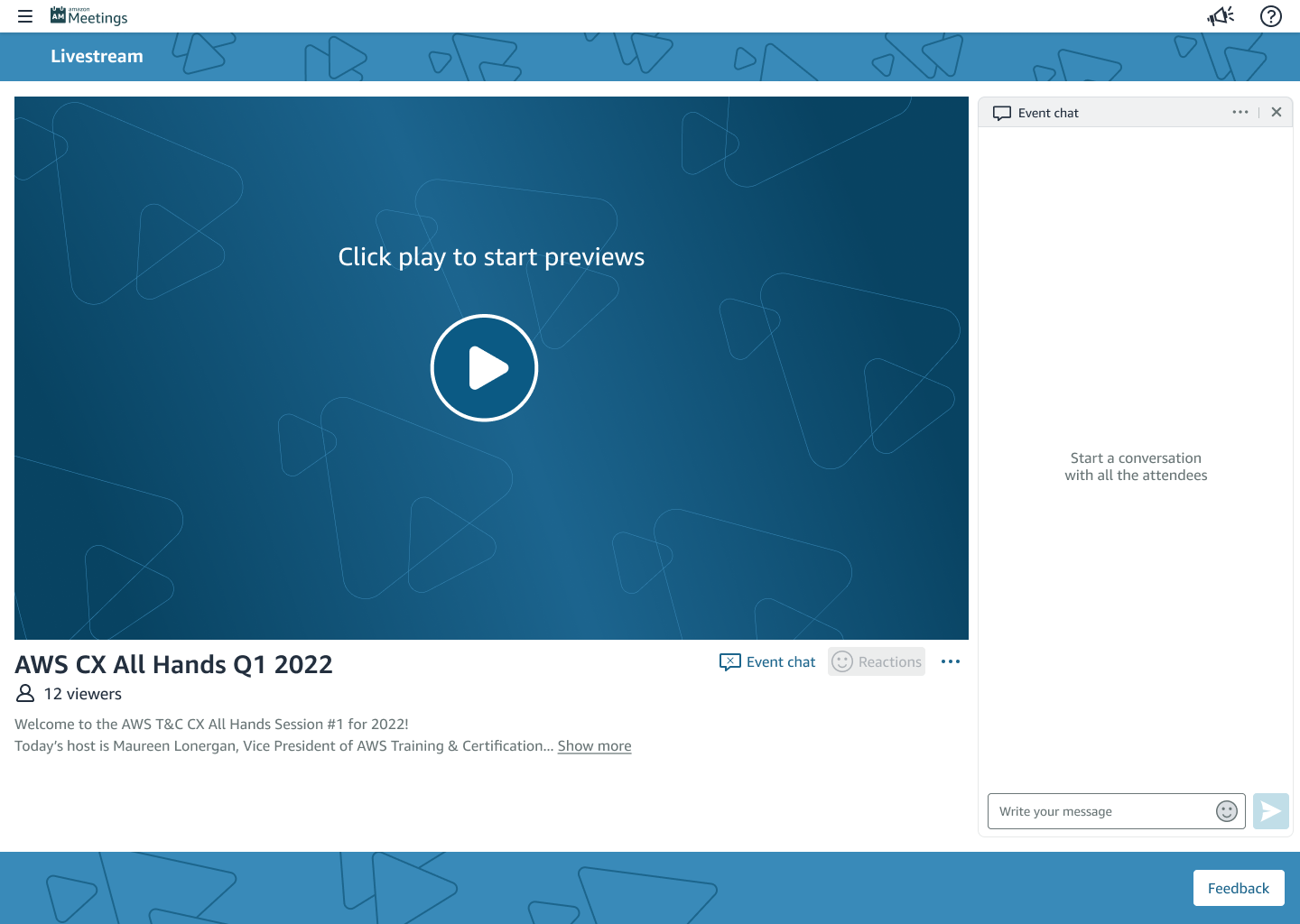
Consistent Viewing Experience Across Events and Devices
I designed a single interface that works across event types and devices (web, mobile, tablet).
The layout follows familiar patterns (video + chat) so users don’t need to relearn the system. I used Amazon Design System components to keep behavior consistent and reduce implementation effort.
This made it easier for users to navigate events and reduced the need to maintain separate interfaces.
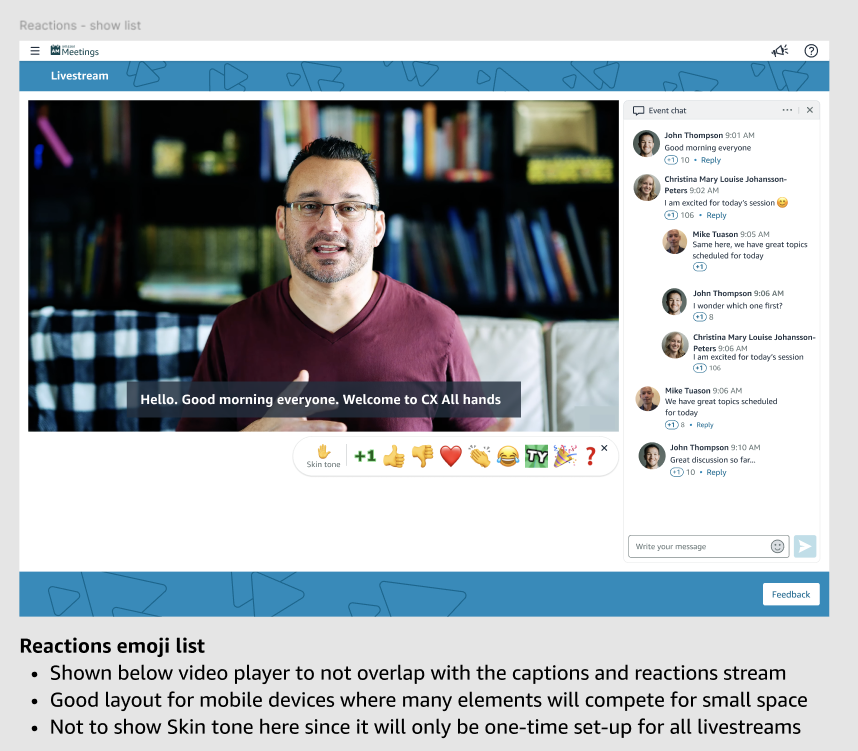
Interaction Without Losing Focus
I designed chat and reactions to allow participation without taking attention away from the content.
Both are visible by default so users can engage quickly, but easy to hide when they want to focus. I limited how much interaction appears in real time to avoid overwhelming the screen.
This balanced engagement with content clarity instead of maximizing one at the expense of the other.
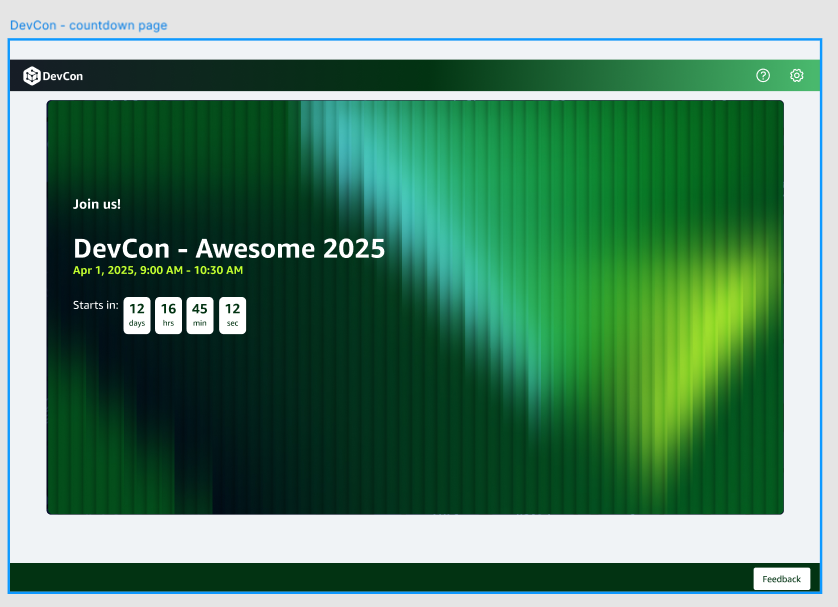
Event-Level Branding Without Breaking the System
I introduced configurable layout regions (e.g. header, footer) so organizers can apply event-specific branding without modifying core components.
This allowed high-profile events to feel distinct while keeping the underlying system behavior consistent.
It also reduced reliance on external tools for high-profile events and avoided one-off implementations by making branding part of the system instead of a custom request.
Supporting Different Viewing Conditions (Dark Mode)
I added dark mode to support longer viewing sessions and different accessibility needs.
Users can switch between light and dark modes, and the system remembers their preference. This reduced visual strain for users watching extended events and improved readability in low-light environments.
Because this was built using existing design system components, it did not add additional engineering overhead.
Impact
- ~60% reduction in event setup time
- Support tickets reduced from ~10 per event to near zero
- +30% increase in audience participation, compared to chat alone
- Scaled to ~160K concurrent viewers
Michael Tuason / Design Portfolio
Amazon
Home
|
|
TIBCO
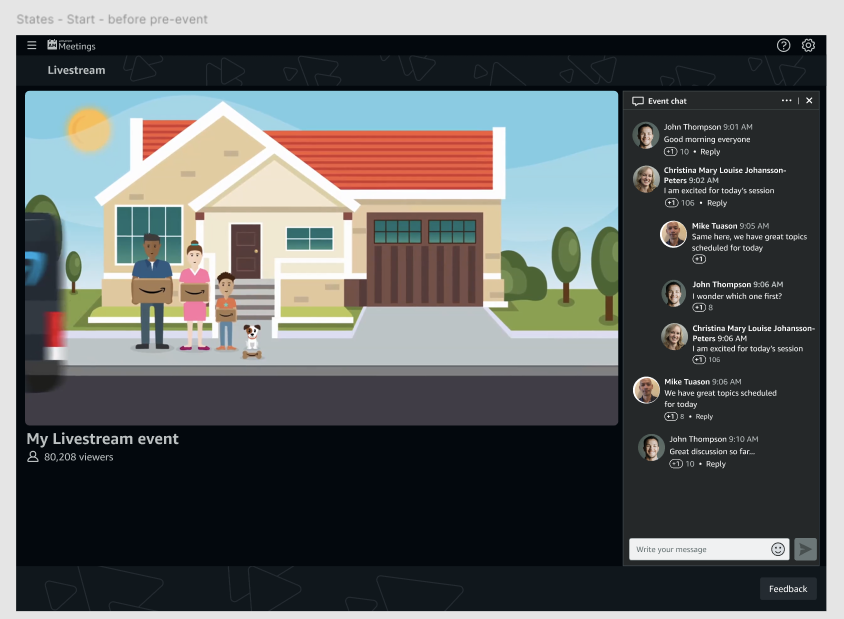
Welcome video to set the right tone for each event
Welcome video to set the right tone for each event
Amazon — Livestream & Real-Time Engagement Platform
User problem
Amazon relied on a livestream platform for ~10,000 internal events per year, including high-visibility company communications.
The system had grown across multiple tools. This led to inconsistent behavior, heavy manual coordination, and high failure risk during live events.
Constraints
- No tolerance for failure during live events
- Multiple roles (organizers, operators, presenters, viewers) with different needs
- Inconsistent workflows across event types
- High concurrency (~160K viewers)
Reducing Setup Errors Before Events Go Live
I consolidated event setup, configuration, and execution into a single guided workflow.
Operators can now see dependencies earlier instead of discovering issues during the event. I used an internal LLM tool to analyze support tickets and identify recurring failure points, then fixed them at the workflow level.
This shifted error detection from live events to setup.
Consistent Viewing Experience Across Events and Devices
I designed a single interface that works across event types and devices (web, mobile, tablet).
The layout follows familiar patterns (video + chat) so users don’t need to relearn the system. I used Amazon Design System components to keep behavior consistent and reduce implementation effort.
This made it easier for users to navigate events and reduced the need to maintain separate interfaces.
Interaction Without Losing Focus
I designed chat and reactions to allow participation without taking attention away from the content.
Both are visible by default so users can engage quickly, but easy to hide when they want to focus. I limited how much interaction appears in real time to avoid overwhelming the screen.
This balanced engagement with content clarity instead of maximizing one at the expense of the other.
Event-Level Branding Without Breaking the System
I introduced configurable layout regions (e.g. header, footer) so organizers can apply event-specific branding without modifying core components.
This allowed high-profile events to feel distinct while keeping the underlying system behavior consistent.
It also reduced reliance on external tools for high-profile events and avoided one-off implementations by making branding part of the system instead of a custom request.
Supporting Different Viewing Conditions (Dark Mode)
I added dark mode to support longer viewing sessions and different accessibility needs.
Users can switch between light and dark modes, and the system remembers their preference. This reduced visual strain for users watching extended events and improved readability in low-light environments.
Because this was built using existing design system components, it did not add additional engineering overhead.
Impact
- ~60% reduction in event setup time
- Support tickets reduced from ~10 per event to near zero
- +30% increase in audience participation, compared to chat alone
- Scaled to ~160K concurrent viewers
Michael Tuason / Design Portfolio


Welcome video to set the right tone for each event
Welcome video to set the right tone for each event
Amazon — Livestream & Real-Time Engagement Platform
User problem
Amazon relied on a livestream platform for ~10,000 internal events per year, including high-visibility company communications.
The system had grown across multiple tools. This led to inconsistent behavior, heavy manual coordination, and high failure risk during live events.
Constraints
- No tolerance for failure during live events
- Multiple roles (organizers, operators, presenters, viewers) with different needs
- Inconsistent workflows across event types
- High concurrency (~160K viewers)
What I Designed
Reducing Setup Errors Before Events Go Live
I consolidated event setup, configuration, and execution into a single guided workflow.
Operators can now see dependencies earlier instead of discovering issues during the event. I used internal LLM tool to analyze support tickets and identify recurring failure points, then fixed them at the workflow level.
This shifted error detection from live events to setup.
Consistent Viewing Experience Across Events and Devices
I designed a single interface that works across event types and devices (web, mobile, tablet).
The layout follows familiar patterns (video + chat) so users don’t need to relearn the system. I used Amazon Design System components to keep behavior consistent and reduce implementation effort.
This made it easier for users to navigate events and reduced the need to maintain separate interfaces.
Interaction Without Losing Focus
I designed chat and reactions to allow participation without taking attention away from the content.
Both are visible by default so users can engage quickly, but easy to hide when they want to focus. I limited how much interaction appears in real time to avoid overwhelming the screen.
This balanced engagement with content clarity instead of maximizing one at the expense of the other.
Event-Level Branding Without Breaking the System
I introduced configurable layout regions (e.g. header, footer) so organizers can apply event-specific branding without modifying core components.
This allowed high-profile events to feel distinct while keeping the underlying system behavior consistent.
It also reduced reliance on external tools for high-profile events and avoided one-off implementations by making branding part of the system instead of a custom request.
Supporting Different Viewing Conditions (Dark Mode)
I added dark mode to support longer viewing sessions and different accessibility needs.
Users can switch between light and dark modes, and the system remembers their preference. This reduced visual strain for users watching extended events and improved readability in low-light environments.
Because this was built using existing design system components, it did not add additional engineering overhead.
Impact
- ~60% reduction in event setup time
- Support tickets reduced from ~10 per event to near zero
- +30% increase in audience participation, compared to chat alone
- Scaled to ~160K concurrent viewers
Michael Tuason / Design Portfolio
TY
Welcome video to set the right tone for each event